Don't Launch Your Products Before You Ask These Usability Testing Questions!
Developing an app isn’t easy and that’s putting it mildly. After all, emotion is crucial to the user experience and when these emotions turn negative and hostil
Developing an app isn’t easy and that’s putting it mildly. After all, emotion is crucial to the user experience and when these emotions turn negative and hostil
Developing an app isn’t easy and that’s putting it mildly. After all, emotion is crucial to the user experience and when these emotions turn negative and hostile towards your app, you know things are going to go downhill from there.
Usability testing reveals the struggles, confusion, and triumphs of users. But what are the right usability testing questions to ask to harness its full potential? We've got you covered. In this article, we'll explore user-centric product development and a comprehensive list of usability testing questions that will help you make your products not just good, but outstanding.
The Importance of Usability Testing
You may wonder about usability testing's importance. How crucial is that? So before we go to usability test questions, here is a bird's eye view of some of the most frequent frustrations that users feel are the root cause of their worries.
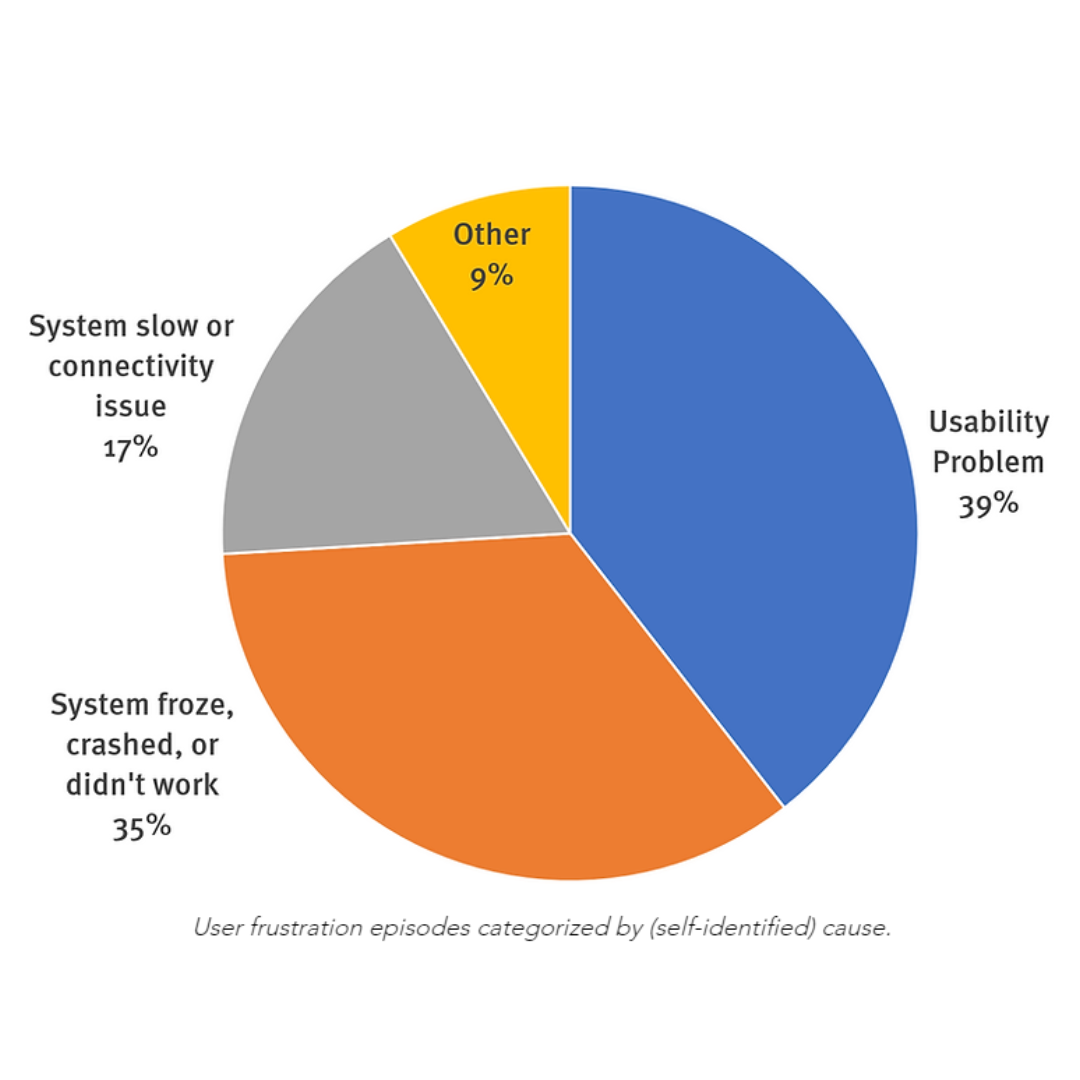
(Source: UX Tigers)
Add to this, user frustrations found in 2023 and you will be astonished!
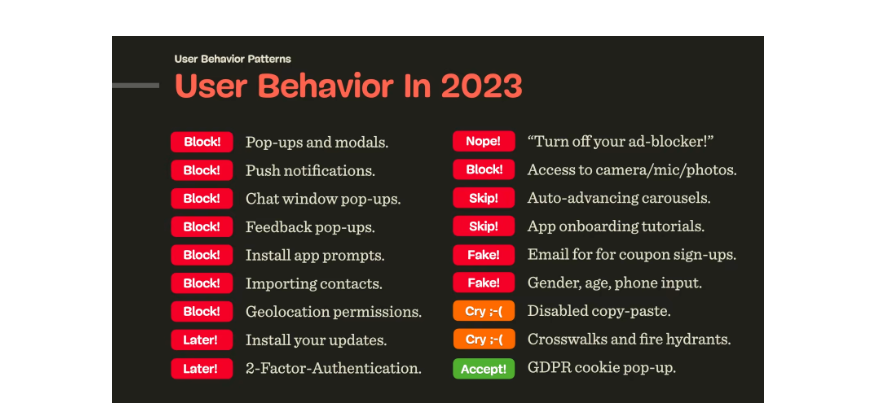
(Source: The Smashing Magazine)
These statistics are opportunities to help us understand how we can create better, more nuanced products that users will come to rely on and use! To do that, usability testing comes into play. Imagine this process as a mirror reflecting how real users interact with your creation.
What Does Usability Testing Do?
Simply put, it's the key to creating user-centric products. Usability testing helps with user-centric evaluation:
Identifies Issues Early: By testing your product with real users, identifying usability issues becomes easy. You can uncover issues and glitches that may have gone unnoticed during development.
Enhances User Experience: It helps with user experience improvement. It ensures that your product is intuitive, efficient, and a pleasure to use, resulting in satisfied customers who are likelier to become loyal users owing to user satisfaction in app development.
Saves Time and Money: Catching and fixing problems early in the development cycle is far more cost-effective than doing so after launch.
Boosts Confidence: Knowing that your product has been thoroughly tested and validated gives your team the confidence to stand proudly behind it.
Beyond Websites: The Versatility of Usability Testing
You may think “Is usability testing only meant for websites?” Well, no, the versatility of usability testing is massive. Since, usability testing is a universal approach that can be applied to an array of products and experiences, including:
1. Software Applications

Whether it's a productivity app, a game, or a complex software suite, usability testing benefits as users gain user-friendly software so they can interact with the software intuitively.
2. Video Conferencing Services

Particularly in remote working situations, user-friendly video conferencing services are paramount. Video conferencing usability testing helps identify glitches and design flaws, leading to smoother virtual meetings.
3. Operating Systems
Operating systems are the backbone of digital devices. Usability testing's importance cannot be neglected as it ensures that users can navigate settings, applications, and features seamlessly.
4. Vehicle UI Systems

The user interface in vehicles is no longer limited to physical knobs and buttons. Modern vehicles often feature intricate digital interfaces. Vehicle UI testing ensures that drivers and passengers can interact with these interfaces safely and efficiently.
5. Experiences

Usability testing helps with user experience enhancement. For instance, testing the process of booking a restaurant table ensures that it's a hassle-free experience for diners. Similarly, the usability of airplane journeys, from check-in to in-flight entertainment systems, can be improved through testing.
Common Usability Mistakes and How to Avoid Them
Usability Mistake 1: Information Overload

The Problem: Too much or too little information can be detrimental. A lack of information leaves users clueless, while information overload leads to an inability to find what's needed.
The Solution: Find the sweet spot. Provide enough information to guide users without overwhelming them. Use concise and scannable content.
Usability Mistake 2: Graphics Overload

The Problem: Striking the right balance between written content and graphics can be tricky. Too many graphics can confuse users instead of simplifying content perception.
The Solution: Use graphics strategically. They should enhance understanding, not complicate it. Ensure a harmonious blend of text and visuals.
Usability Mistake 3: Unusual Functional Block Placement

The Problem: If your app's structure doesn't align with users' mental models, they'll struggle to find what they need.
The Solution: Prioritize user expectations. Organize information logically, following familiar patterns.
Usability Mistake 4: Absence of Guidance

The Problem: While intuitive design is vital, users still need guidance. The absence of guidance or lack of help and documentation can leave them frustrated.
The Solution: Provide accessible, task-focused guidance. Offer concrete steps, not lengthy explanations.