How Error & Exception Handling Works in PHP Framework with Examples
Error and exception handling in PHP are powerful mechanisms. While exception handling helps change the usual flow of the code execution if a specified error occ

Error and exception handling in PHP are powerful mechanisms. While exception handling helps change the usual flow of the code execution if a specified error occ
Error and exception handling in PHP are powerful mechanisms. While exception handling helps change the usual flow of the code execution if a specified error occurs, procedural error handling in PHP detects errors raised by your program and then takes the necessary course of action. How does this help though?
In this article, we discuss error & exception handling and throw light on why it matters. In the first half of the article, we talk about error handling in PHP and how it works. In the second half, we show you exception handling by giving real-time examples.
What is Error Handling?
Error handling is a way of catching errors generated by your program/code and then taking appropriate steps to solve this error. If you handle errors properly then your program will run smoothly without any failures and system crashes. It's very easy in PHP to handle errors.
A PHP error occurs when something is wrong in your PHP code. For example, it can be a missing semicolon, calling an incorrect variable or file does not exist, etc.
There are four types of errors in PHP when dealing with PHP error handling best practices and they are as follows:
1. Warning Error
2. Notice Error
3. Parse Error
4. Fatal Error
Now I will give you an idea of all these errors with examples:
1. Warning Error:
A warning error is a type of error that does not stop the execution of the script, it only warns you that there is a problem in your program which might cause bigger issues in the future.
The main reason for warning errors is to include a missing file or passing an incorrect number of parameters in a function.
Example:
<?php
echo "Warning Error!!";
include ("function.php");
?>
Output
In the above code, we include a function.php file but the function.php file does not exist in the project directory. So, in that case, there will be a warning error produced but it does not stop the execution of the script i.e. you will see a message for "Warning Error !!" and after the warning, you will see another message for "Below the Warning Error Section!!".
Like the following image:

2. Notice Error
Notice error and warning error both are similar which means it does not stop the execution of the code.
It occurs when you try to access an undefined variable, then it generates a notice error.
Example
<?php
$a=10;
echo "Notice Error !!";
echo $b;
echo "Below notice error";
?>
Output
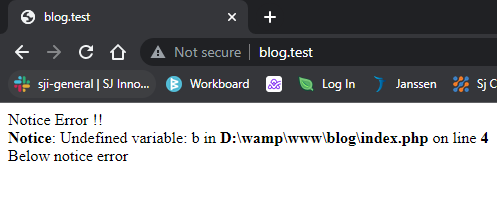
In the above code, we defined a variable named $a. But we call another variable $b, which is not defined. So it will produce a notice error but it does not stop the execution of the script i.e. you will see a message "Notice: Undefined variable: b" and after this notice error you will see another message for "Below notice error!!". Like the following image:
3. Parse Error
A Parse error is a type of error that you need to know about when dealing with PHP error handling best practices and is caused by misused or missing symbols in a syntax. A parse error is also known as a Syntax error. The compiler catches the error and stops/terminates the execution of the script. After fixing the syntax error the compiler compiles the code and executes it.
Some common reasons for parse errors are:
- Unclosed quotes/braces
- Missing or Extra parentheses/semicolon
- Misspellings
Example
<?php
echo "A";
echo "B"
echo "C";
?>
Output
In the above code, we missed the semicolon in the second line. As a result, when the compiler compiles the code it will produce a parse or syntax error which stops the execution of the script i.e. you will see a message "Parse error: syntax error". Like the following image:

4. Fatal Error
A fatal error is another type of error that is caused due to the use of an undefined function or class. That means if you are trying to access an undefined function or class, then it will generate a fatal error and it will stop the execution of the script.
It is the type of error where the PHP compiler understands the PHP code but it recognizes an undeclared function. This means that function is called without the definition of the function.
Example
<?php
function message()
{
echo "Hello team";
}
sms();
echo "Fatal Error !!";
?>
Output
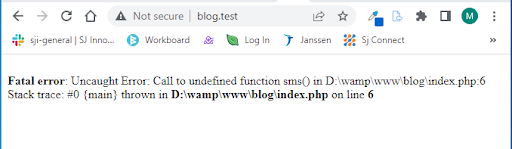
In the above code, we defined a function named message but we call another function sms which is not defined. So it will produce a fatal error that stops the execution of the script. Like the following image:
Ways to Handle PHP Errors
Procedural error handling in PHP can be