How to create a registration system with email verification using php
In the digital age, the entry point to any online service is through a seamless registration process. It’s the handshake that begins the relationship between yo

In the digital age, the entry point to any online service is through a seamless registration process. It’s the handshake that begins the relationship between yo
In the digital age, the entry point to any online service is through a seamless registration process. It’s the handshake that begins the relationship between your website and your users. But how do you ensure that this crucial first interaction is both welcoming and secure? Cue PHP, a reliable ally in the web development arena.
Welcome to "how to create an authentication system in PHP?" – your no-nonsense guide that walks you through constructing a user registration pathway that’s not just user-friendly but also armored against security breaches.
Step-by-Step Guide on How to Create an Authentication System in PHP
In this article, I will tackle the essential task of how to verify email with a verification code using PHP, while also discussing how to send an email from localhost. Additionally, we'll delve into crafting a secure registration system that incorporates email verification using PHP to safeguard your user's digital interactions.
In creating our PHP registration system, I will focus on using procedural or 'row' PHP, steering away from object-oriented programming (OOP). For efficiency and a touch of style, the user registration PHP script will be enhanced with Bootstrap code to expedite development and ensure responsiveness.
Additional things we will need:
- phpMailer library
- mailtrap.io account credential for sending emails
First let’s create a database and a table. Database name is `verification` and table name is `users`.
The columns which I will create to validate is,
Id, email, password,code, is_verified.
This is the code to create the table.
CREATE TABLE `verification`.`verification` ( `id` INT(11) NOT NULL AUTO_INCREMENT , `name` VARCHAR(50) NOT NULL , `email` VARCHAR(60) NOT NULL , `code` VARCHAR(10) NOT NULL , `is_verified` TINYINT(3) NOT NULL DEFAULT '0' , PRIMARY KEY (`id`)) ENGINE = InnoDB;
Now let's move to the coding part.
First I am creating a folder named as verification inside my local server folder. It might be www/htdocs based on your server app(wamp/xampp/ampps etc )
Now inside this `verification ` folder I am creating those files.
- Registration.php
- Verify.php
- Db.php
- sendEmail.php
Let's initiate our journey by setting up 'db.php.' In this foundational file, we'll establish a connection to the database necessary for our email confirmation script. This crucial step paves the way for further PHP user authentication processes in our system.
Below, you'll find the pertinent code for 'db.php'
<?php
$servername = "localhost";
$username = "root"; // user name for the server
$password = "mysql"; // password for the server
$conn = mysqli_connect($servername, $username, $password);
if (!$conn) {
die("Connection failed: " . mysqli_connect_error());
}
?>
So our database is connected now.
With our database now connected, we'll advance our secure registration PHP process by integrating email functionality. To to download it go to this link: PHPMailer/PHPMailer: The classic email sending library for PHP (github.com)
Once downloaded, rename it to PHPMailer and place this folder within our project directory. Our project, aptly named verification, will now house the PHPMailer, reinforcing our secure PHP registration system with email confirmation capabilities. Place the PHPMailer folder inside the verification directory to proceed.
So our project folder looks like this.
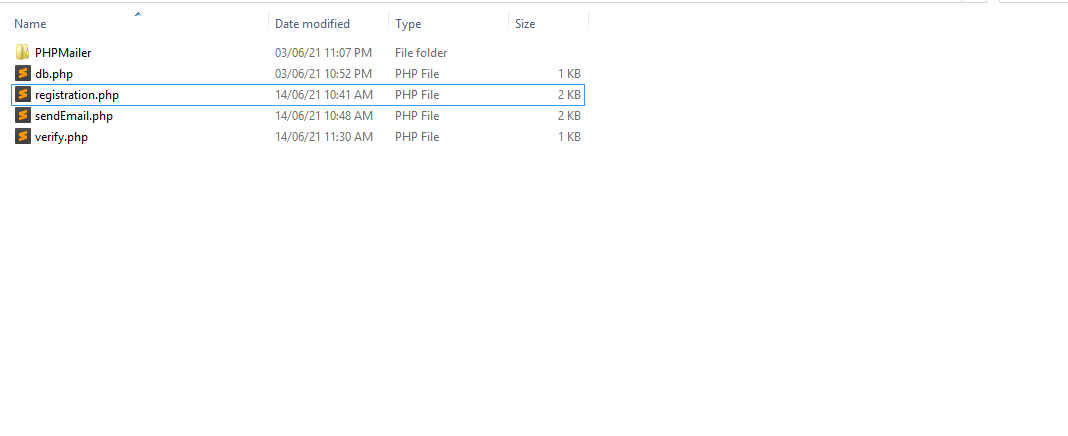
Now our mailer library is also integrated. Let’s configure the mailer code.
Before configuring, let's get the mailtrap.io credential. To get this, login to your mailtrap.io account and get the credential as mentioned in the screenshot below.
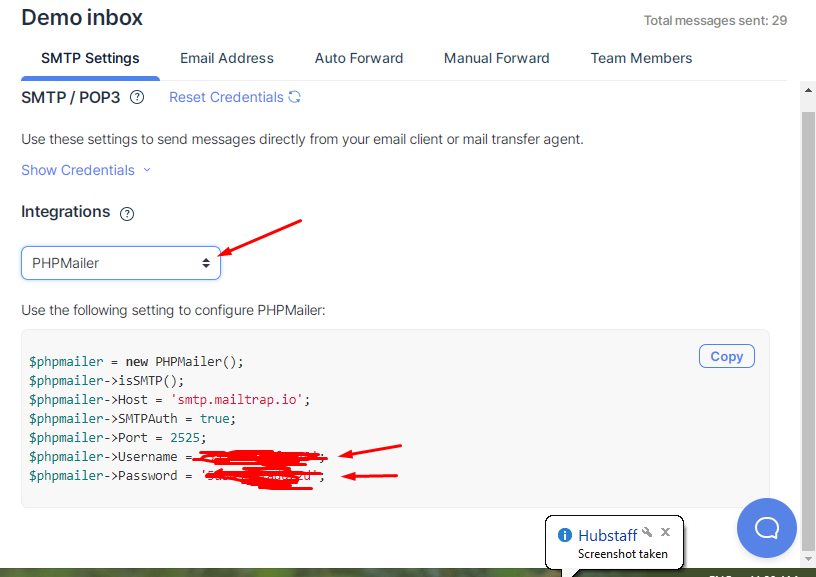
Now open sendEmail.php and paste the below code.
<?php
use PHPMailer\\PHPMailer\\PHPMailer;
use PHPMailer\\PHPMailer\\Exception;
class sendEmail
{