Magento 2 Custom Module Development
Magento module development services are all the rage today! After all, Magento development services is one of the most powerful and widely used e-commerce CMS.

Magento module development services are all the rage today! After all, Magento development services is one of the most powerful and widely used e-commerce CMS.
Magento module development services are all the rage today! After all, Magento development services is one of the most powerful and widely used e-commerce CMS. Since it's specifically built for e-commerce, it includes almost all the important features that are required to manage your online store.
Besides utilizing the potential of Magento module development services, did you know that you can also create a winning lead magnet with Magento on AWS. Watch the video:
Magento 2 comes with a wide range of features and you can maximize on its potential with Magento module development services, but if those features don't seem to fulfill all of your requirements, then you can always add more custom features to it.
I will try to explain the Magento 2 Custom Module development as detailed as possible.
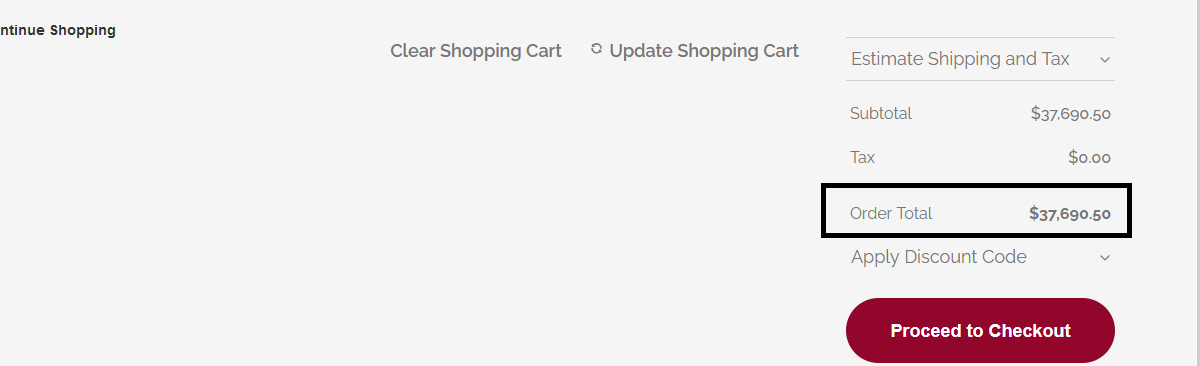
Let's first understand Magento module development services and what the module will do. We are going to develop a custom module, specializing in Magento module development services, that will round off the total cart price, i.e., if a user has added 125.5 USD worth of products in the cart, then it would get rounded off to 126 USD.
Given below is the amount that we will be rounding off.
In order to build this module, let’s first understand the folder structure for building a custom module. If you're looking for help with this or with Magento module development services, our team of experts can help.
App -> Code -> Vendor Name -> Module Name
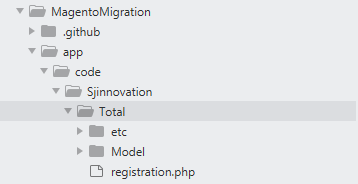
Here, the vendor is SJ Innovation and Total is the Module name. Please ignore the other files and folders for now. We will be exploring them in detail as we progress.
In order to create and register a custom module, we have to create 2 files
- registration.php ( inside Modules root folder )
- module.xml ( inside the etc folder )
1. Create a file named registration.php in the modules root director

Now open the file and copy given below code
<?php
\\Magento\\Framework\\Component\\ComponentRegistrar::register(
\\Magento\\Framework\\Component\\ComponentRegistrar::MODULE,
'Sjinnovation_Total',
__DIR__
);
Here Sjinnovation is the name of the vendor and Total is the name of the module.
2. Now create a file named module.xml in etc folder
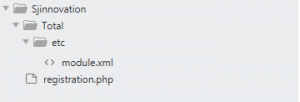
Copy the given content below in the module.xml file
<?xml version="1.0"?>
<config xmlns:xsi="http://www.w3.org/2001/XMLSchema-instance" xsi:noNamespaceSchemaLocation="urn:magento:framework:Module/etc/module.xsd">
<module name="Sjinnovation_Total" setup_version="2.2.0">
</module>
</config>
Here "Sjinnovation_Total" is the name of the custom module
Now you have to run the command given below.
php bin/magento module:status
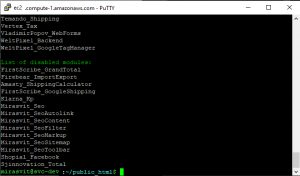
As soon as you run this command, you will be able to see your custom module getting listed in Magento. This means that our module, which offers Magento module development services, is registered, but if you notice that it's still coming on the disabled list, that means that our module is registered, but not yet enabled in the system. We will be enabling it soon.
But first, let's move onto the next step, i.e to write the logic which will round off the total cart amount.
In order to achieve this, we have to override Vendor\\Magento\\Quote\\Model\\Quote\\Address\\Total\\Grand.php which calculates the Cart’s total amount.
Please note that this is the core file of Magento 2, and we will be overriding it in our custom module.
Create a file named di.xml in etc folder
Copy the content given below in di.xml
<?xml version="1.0"?>
<config xmlns:xsi="http://www.w3.org/2001/XMLSchema-instance" xsi:noNamespaceSchemaLocation="urn:magento:framework:ObjectManager/etc/config.xsd">
<preference for="Magento\\Quote\\Model\\Quote\\Address\\Total\\Grand" type="Sjinnovation\\Total\\Model\\Quote\\Address\\Total\\Grand" />
</config>
In this file, I have specified 2 things in preference
- Which file should be overridden ( for="Magento\\Quote\\Model\\Quote\\Address\\Total\\Grand" )
- The file which will be overriding it ( type="Sjinnovation\\Total\\Model\\Quote\\Address\\Total\\Grand" )
Now, since we are overriding a model, we have to create a folder named "Model" and then follow the folder structure in the core module.
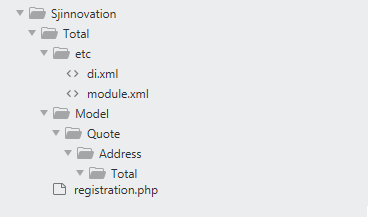
Now create a file named Grand.php (Refer fig for the location of the file)
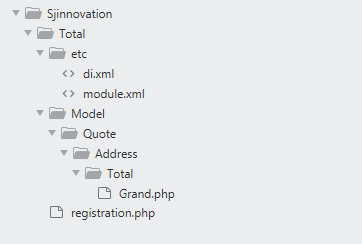
Copy the content given below in Grand.php
<?php
namespace Sjinnovation\\Total\\Model\\Quote\\Address\\Total;
class Grand extends \\Magento\\Quote\\Model\\Quote\\Address\\Total\\Grand
{
public function collect(
\\Magento\\Quote\\Model\\Quote $quote,
\\Magento\\Quote\\Api\\Data\\ShippingAssignmentInterface $shippingAssignment,
\\Magento\\Quote\\Model\\Quote\\Address\\Total $total
) {
$grandTotal = $total->getGrandTotal();
$baseGrandTotal = $total->getBaseGrandTotal();
$totals = array_sum($total->getAllTotalAmounts());
$baseTotals = array_sum($total->getAllBaseTotalAmounts());
/* code edited here */
$totalCartAmount = round($grandTotal + $totals);
$total->setGrandTotal($totalCartAmount);
/* code edit end */
$total->setBaseGrandTotal($baseGrandTotal